In the Round Up posted last week, there was mention of a new item in the forecast page: “Enterprise Support & Services”. That definitely caught my eye. Here’s the description for it:
We’re working on bringing a specialized ExpressionEngine Enterprise License that provides private support & services to the teams in our community that need those options for their biggest projects. Our initial solution will be very focused, available on a limited basis, and designed to scale effectively.
ExpressionEngine is a unique product in that often it can play at an enterprise level; and, despite how brilliantly you build it, some clients will need support beyond your engagement with them. Options are pretty limited at that point, because either you tell your big league client to just hit the EE forums and they’ll be fine, or hire an EE ninja to do it for them.
This item just hit the forecast page, so I’m not getting my hopes up that we’ll see any big changes to it soon, but I have my eyes peeled.
Do you guys have any thoughts on this? How would enterprise-level support change the way you pitch EE to your potential clients? What would you like to see that support look like?
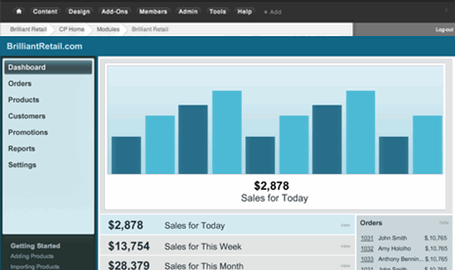
E-commerce for EE2 is finally here with the release of BrilliantRetail. Some people have expressed concern about BrilliantRetail’s data not being stored in channel entries, so Nico De Gols tried to help ease those fears by writing NDG Brilliant Bridge, which allows you to…well, you can read all about it below, in addition to info about the other fine releases this week:
Transcribe($, for EE1) by Tom Jaeger (EE Harbor) Transcribe is an ExpressionEngine addon that makes the creation of multi-lingual ExpressionEngine websites simpler by taking a two fold approach by simplifying the management of multi-lingual template content, and simplifying the management multi-lingual weblog / channel entries.
NDG Brilliant Bridge(for EE2) by Nico De Gols NDG Brilliant Bridge allows a tight integration of BrilliantRetail products and your favorite EE add-ons. It brings standard channel entry functionality to your entire product catalog. You can let site visitors comment on your products, use an entry rating add-on, keep track of favorites etc. It closes the gap in an automated way so you can be flexible in whatever way you want to use BR.
Flexi Channel Entries Limit($, for EE2) by Milan Topalov Add “Show 10 | 25 | 50 entries per page” to your channel entry list pagination.
Tabify($, for EE1) by Isaac Raway (Airways) Tabify allows you to place any custom field into a Publish Tab on the EE Publish and Edit pages. You can use this to move extra fields out of the main form. This provides functionality similar to Publish Layouts in EE 2.0.
NSM Entry Select(for EE2) by Leevi Graham (Newism) Select entries for simple relationships.
Category Sorted Entries(for EE2) by Michael Rog Like the standard Category Archive Tag, but with added control for filtering by entry_id or category, displaying by group_id, and outputting entry_id and url_title.
Threaded Comments($, for EE2) by IntoEEtive (Yuriy Salimovskiy) This add-on enables nested commenting (comment on comment, reply to comment) for ExpressionEngine. Threaded comments are fully compatible with first-party comment module (so existing comments will be kept and all extensions will continue working). You can have unlimited depth of comment nesting.
Postman($, for EE2) by Jack McDade (Lobster War Machine) Postman combines the fantastic services of Postmark and PostageApp with the simplicity of ExpressionEngine’s templating system to bring you the very first transactional email module for EE.
BrilliantRetail($, for EE2) by Brilliant2 (David Dexter) BrilliantRetail brings powerful e-commerce to ExpressonEngine 2.
EP Media Resizer(for EE1 & EE2) by Electric Putty Resizes any embedded media item (Video, Google Map, Audio clip) to specified height and width.
Hmm… I’m not sure if this is a positive, perhaps slightly romantic, tweet; or if it’s typed in disappointment, sadness, and frustration. Maybe somewhere in between?
Russ just released a new document to go with it called “ExpressionEngine and Content Management Systems”. It’s a basic intro, to and history of, content management systems. Looking at Russ’s plans for these and future documents, this new one looks like the prequel, and the Multiplier Effect is part two. Parts 1 and 3 haven’t been published yet.
These documents are already great and very useful. When they’re all out there, I think we’re going to have a pretty dang handy tool on our hands.
If you happened to already have listened to the latest EE Podcast you might recall Ryan and Lea talking about how they decide if an add-on is something they are willing to add to the site they are building. There are a lot of factors that go into this kind of decision: Whether the developer will continue to support the add-on, any potential performance drawbacks, does it make the clients life incredibly easier, etc.
My question for today’s “Ask the Readers” segment is: Do you have a process for deciding what kinds of add-ons you will install? What reasons might you have for avoiding an add-on?
EE Podcast #38 is out with Ryan and Lea talking about the important topic of future proofing your ExpressionEngine Site. They discuss choosing reliable add-ons, documentation, making smart coding decisions and more. This is a great topic and there are some good ideas in there for better equipping your clients for the road ahead.
This is the first installment of a newly improved weekly feature here on EE Insider. Welcome to EE in the Wild by Show-ee. Jeff and Marcus have graciously agreed to publish a regular feature highlighting some of the websites they have in the catalogue over at Show-ee. Take it away, Jeff!
MO Blues Association
Now running on EE2, this site redesign by Feisty Goat Interactive of the MO Blues Association is worth a closer look. A beautiful design, some custom add-ons and great content. Nice work, guys.
The Groom’s List, developed by Jason Schmidt touts itself as the most “to the point” resource for grooms. I’m attending a wedding in a few months as the best man (hold your jokes) and it was great to see some useful info here. Nice clean design, running on EE2 and using some popular add-ons such as Playa, Matrix and Solspace Favorites.
Climate Wisconsin, developed by Two Six Code, is an educational multimedia project featuring stories from across Wisconsin. Lots of interesting information, wonderful photography and some beautiful illustrations make this a great site! Running EE2.
The fancy new ecommerce platform on the block, BrilliantRetail emerged from beta-land and it looks pretty dang snazzy.
Some of the features the BrilliantRetail folks highlight are:
Automated Emails
Use add-ons like Wygwam
Customers are EE Members
Google Charts Dashboard
Faceted Navigation
Payment Gateways
Bundle All Product Types
BrilliantRetail looks very polished and I’m excited to see yet another awesome-looking ecommerce platform out there for EE. BrilliantRetail costs $125 and is available from BrilliantRetail.com and Devot:ee.
Installing ExpressionEngine is a simple process. Follow this free 16 minute video and learn how to install ExpressionEngine 2 like a pro. We'll walk you through the entire process step-by-step, including explaining software requirements, file permissions and more.
After installing Ampersandwich on your deliciously beautiful ExpressionEngine site, you type nerds may want to wrap your skinny emo selves in an Ampersandwich Tee from Simplebits before updating your Gravatar image and pulling that into your site with the new CE Gravatar. Just sayin’.
CE Gravatar(for EE2) by Causing Effect (Aaron Waldon) This plugin facilitates the use of Gravatar images in your ExpressionEngine templates. It provides an easy interface to all of the options currently available for Gravatar images. You can even run a conditional statement to check if a Gravatar image exists for an email address.
Country Variables(for EE2) by Big Unit Solutions Allows you to make global variables country-specific. For example, declare a variable ‘phone_number’ just once and give it different values for different countries. Can automatically detect country based on ip address too.
Ampersandwich(for EE2) by Scott Boms This plugin encodes ampersands in ABBR tags to allow them to be targeted using CSS selectors so the best one can be used as suggested in Robert Bringhurst’s “The Elements of Typographic Style”.
NSM Transplant($, for EE2) by Leevi Graham (Newism) NSM Transplant is an ExpressionEngine 2.0 port of LG Replace. The purpose of the plugin is to temporarily cache rendered tagdata and re-render it outside of its original context eg: a {exp:channel:entries} tag.
Profile AntiSpam($, for EE1) by Laisvunas This extension displays a panel containing list of suspected profile spammers in Control Panel’s home page and simplifies their banning.
NSM Publish Hints(for EE2) by Leevi Graham (Newism) NSM Publish Hints is an ExpressionEngine 2.0 custom field that allows you to add togglable publishing hints and instructions to the Publish form.
My Happy Cog colleague, Jenn Lukas, wrote a nice post on The Nerdary about commenting your code. She mentions that when she’s doing front-end templates, she uses PHP to write comments instead of HTML. Our friend Ryan Masuga mentioned in the comments how he uses EE template comments to do the same.
Commenting my code has become practically second nature for me at this point, and I’ve recently started commenting my code before I even write it if I’m ever doing anything clever or tricky, to give myself a plan of attack for my code. I’ve never much preferred HTML comments, and as I mentioned in my comment to Jenn’s post, I even had a nasty situation where IE6 was crashing on a page until I removed a seemingly innocuous HTML comment.
I recommend you do the same, and maybe even create a Textmate/Coda/editor-of-choice snippet to make your EE comments even easier.
I’ll bet you rarely pay much mind to the calendar tag, right? I know I don’t. I use it maybe once every two or three years. Trevor Davis from Viget Labs decided to dust off the calendar tag and dress it up a bit with some fancy CSS and Javascript.
He wrote a great how-to at Viget Inspire explaining the process and arming you with the code to build it as well. The end result is a nice mini calendar widget, with links to entries and month-to-month scrolling. Very cool!
There are two EE Help Chats today! They are a great way to spend an hour talking shop, getting help figuring out something you’re been working on, or just spending time with the ever-so-helpful EE Community.
European EE Help Chat
Our European EE Help Chat takes place at 19:00 GMT. If you follow @eeinsider on Twitter, you’ll find a reminder tweet about 15 minutes before. Visit this URL at the time of the chat to gain access to the room: http://mijingo.com/europe-chat
EE Help Chat
The original chat still takes place at the regular time of 9 PM Eastern at http://mijingo.com/go-chat. As with the other chat, we typically post a reminder on Twitter about 15 minutes before.
Here's a quick tip that you can use when preparing your ExpressionEngine website for client training or hand-off. We want to make sure that the control panel works exactly as it should for each user, so it's always a good idea to log in as that user and take a look. Did you know that you can do this right from you Super Admin control panel? Let's take a look how.
The EECI 2011 Conference website is starting to show some life! Finally the 2010 site is gone, replaced with little more than a placeholder for 2011. You can sign up to stay updated by entering in your email address.
EECI 2011 will be 19 - 21 October, 2011 at The Invisible Dog Art Centre, Brooklyn, NY.
Are you planning on coming? I hope to see you there!
Did you order the Fusion Ads bundle which included an EE2 License? It’s all packaged up and waiting for you at the front desk. Better go pick it up!
The bundle included a freelancer license, but you can use it to upgrade to a commercial or a non-commercial license, if you like, at a healthy 40% discount. Whichever path you decide, it’s a dang good deal.
The problem is that using embeds to pass content from one template to another works well enough, but it comes at a price of extra overhead to EE and plenty of potential for extra complexity for your templates.
I love the idea of using a plugin to solve this problem. John’s how-to describes an excellent way to do this and make your templates a lot easier to work with and definitely more elegant. John’s code examples are fantastic, and he walks you through the whole process very well. Plus, if you’ve ever wanted to roll your own plugin, then this is a great way to get started, too.
A slow week in add-on submissions to kick off 2011. Add-on developers must still be hung over from their holiday revelry. At any rate, we wish every EE dev plenty of water, ibuprofen, and beauty sleep. Here are this week’s submissions:
JSON(for EE2) by Rob Sanchez (Barrett Newton) Output ExpressionEngine data in JSON format.
Shoutbox(for EE2) by Michiel Papenhove (Pink Tutu) Allows for a simple AJAX Shoutbox (using jQuery) to be implemented on an EE website.
Lorem Ipsum(for EE2) by Big Unit Solutions Basic lorem ipsum dummy text generator. Generates lorem ipsum text.
Spam-Freeform(for EE1 & EE2) by Derek Hogue (Amphibian Design) Spam-Freeform runs submissions from Solspace’s Freeform module through the Akismet anti-spam service.
I missed this when it came out last year, but I found it by luck this morning and figured I’d share it: Michael Rog built Registration Codes, a great add-on that uses customizable registration codes to place users into member groups.
How does it work? You create a set of registration/invitation codes, and you give them out to people registering for your site. Based on what code you give them it will put them into member groups. (For instance, could give out a general code that will put people into a regular “Members” pool and give out, to a select few, a VIP code that will put them in a fancier group). The great thing is that you can set it so that if you don’t have a code, you won’t be able to register.
Registration Codes costs just $9, MSM compatible, and plays nice with the Solspace User module. Screenshots and purchase information are best found at Devot:ee, and documentation is at RogEE’s site.

 Comments (5)
 Share on Twitter
 If you happened to already have listened to