
Blog Entry
You may have seen this come in across the wire last week in the Weekly Devot:ee, but I wanted to highlight it a bit more. LibrarEE is a new ExpressionEngine module which “helps designers and developers to interact with snippets, global variables and specialty templates as files rather than in the browser”.
What does this mean exactly? It means that lots of those annoying little things that you had to create and edit via the browser can now be done in code from your favorite text editor. With LibrarEE, all your snippets, global variables, and notification template are now editable via file-based templates. What’s more, they’re parsed as EE templates too.
My favorite example, and the reason I wanted to mention this on EE Insider, is the user message template. Ever seen the boring ol’ EE system status page that says something like “You’re logged in.” or “Please wait while we direct you to your search results.”? Awful, right? Well to edit those, you have to go into the control panel and edit the “User message” template. You can’t use any embeds or EE tags, which means if you want to include a global header and footer, you have to copy and paste in that HTML by hand: Yuck.
The promise of LibrarEE is that you can now treat those templates as real, live EE templates, with embeds and EE tags and whatever you like. Not only that, but if they’re in the file system, that means you can keep them in version control and out of the database. Handy!
It sounds pretty dang slick, and I can’t wait to use it. LibrarEE is just $30 and available exclusively through Devot:ee.
Blog Entry
Yesterday, Train-ee announced two new opportunities to attend classroom training for ExpressionEngine:
- The first class is another installment of Mike Boyink’s basics of ExpressionEngine class. This class takes place from March 29th to April 1st.
- The second class, a brand new offering, is an advanced class that teaches you everything you need to know about developing add-ons for ExpressionEngine.
Both classes take place in sunny and warm Scottsdale, Arizona and include a non-commercial license for ExpressionEngine.
Blog Entry
Versa Studio (formerly exp design) is running an ExpressionEngine giveaway to celebrate their new name. If you enter (see their blog post for details) you’ll be in the running for a free Freelance copy of ExpressionEngine. Sounds good, right?
While you’re over at the site, check out their Web site planning guide, a free download (requires submitting email address) that walks you through the entire process of building a website.
Learn more at Versa Studio.
Blog Entry

What a massive load of add-ons submitted this week! If you were waiting for a way to do polls in EE2, wait no more: there were two separate poll modules released this week. Check out those and the rest of the goods below.
- Advanced Prev Next Entry ($, for EE2) by Biber Ltd. (Can Berkol)
ExpressionEngine 2.x native prev-next entry functionality does not let you to filter and sort your entries in many ways; also it does not provide cycling through your entries. This plugin brings some advanced functionality and a bit more freedom to you in building “previous and next” links.
- LibrarEE ($, for EE2) by LibrarEE (Nico De Gols / Carl Crawley)
Libraree is an ExpressionEngine module which helps designers and developers interact with snippets, global variables and specialty templates as files rather than in the browser. It will improve your workflow and speed up the time needed to put your project together. Plus, it provides the ability to quickly style notification emails into beautiful HTML emails and style all system messages into proper designed templates.
- Commenters ($, for EE1 & EE2) by Laisvunas
This plugin displays list of comment authors and entries they commented on.
- Channel Polls ($, for EE2) by DevDemon
Channel Polls brings easy to use Polling to any Channel you wish through a simple to install Fieldtype. Within minutes you can create a poll and show the results to your visitors. Channel Polls delivers a simple install, administration, and usage of polling within the tools you are already familiar with, the ExpressionEngine publish page.
- 3Easy Last Editor (for EE2) by 3Easy
EE2 Extension Adds Channel Entries Last Editor
- Matrix Multi-Upload (for EE2) by Pixel & Tonic (Brandon Kelly)
Matrix Multi-Upload lets you upload a batch of files to a Matrix field at once, right from the Publish page.
- Module Nav (for EE2) by Pixel & Tonic (Brandon Kelly)
Module Nav is an EE2 accessory that makes two changes to EE2’s top navigation. It replaces the “Add-Ons” menu with a new “Modules” menu, populated with links to your modules’ CP backends. It also moves the old “Add-Ons” menu into the “Admin” menu, under “Add-on Administration”
- Wygwam No Upload Tab (for EE2) by Pixel & Tonic (Brandon Kelly)
This EE2 extension removes the “Upload” tabs from the Link, Image, and Flash dialogs, forcing authors to click the “Browse Server” buttons and upload files via CKFinder.
- Zenbu ($, for EE2) by Nicolas Bottari
Zenbu is a powerful and customizable entry list manager which enables you to see more entry data, such as data stored in custom fields. Zenbu also has many entry filtering options.
- JP Category Select (for EE2) by Joe Paravisini
Allows you to display a dynamic category checkbox tree as a standalone fieldtype. In addition to being damn sexy, this also allows you to use categories that are not formerly assigned to the channel.
- JP Recently Viewed (for EE2) by Joe Paravisini
This add-on allows you to display a list of channel entries that have been recently viewed by the user.
- GWcode Categories (for EE2) by Leon Dijk (GWcode)
List all, last child categories only or categories of a certain (minimum, maximum, fixed) depth, for a channel, for one or more category groups, for an entry or overall. And more.
- Auto Tweet (for EE1) by Aaron Gustafson
Allows you to set up automated tweeting of entries, based on a schedule.
- Easy Language Select (for EE1 & EE2) by Aaron Gustafson
A simple dropdown for language selection, driven by EE’s own language file.
- Excerpt (for EE2) by Clayton McIlrath
Limits the number of words in some text, after stripping tags.
- Site Switch ($, for EE2) by Benjamin David
Site Switch redirects your iPhone and iPad visitors to an optimized version of your website.
- Polls ($, for EE2) by Tom Jaeger (EE Harbor)
Simple, flexible Polls for your ExpressionEngine websites. Polls can be added to your site with a single template tag or you can completely customize the look of your polls with the available template tags.
- Google Translate (for EE2) by Benjamin David
Google Translate is an ExpressionEngine 2 accessory that lets your translate your texts right from the control panel. This add-on is using Google Translate engine and lets you translate any text in more than 100 languages.
Blog Entry
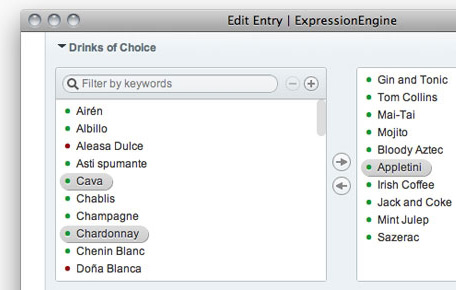
Not even ten months after releasing Playa 3, Pixel & Tonic announced Playa 4 with a host updates.
Playa 4 now uses the Translucent UI, a look and feel that garnered much praise when Pixel & Tonic debuted it in Matrix 2.
Under the hood there are plenty changes too, with updated converters to help transition to Playa, loads of new template tags, and, notably, the dropping of EE1 compatibility. If you’re still BFF’s with EE1 and can’t stand the thought of not buying Playa for it, not to worry: For the time being Playa 3 will be bundled with Playa 4.
Playa 4 looks downright fantastic. Check it out at Pixel & Tonic, or Devot:ee.
Blog Entry
As EllisLab announced late yesterday (and we reported this morning), a beta release of EE 2.1.4 is out for those already owning an EE 2 license. I downloaded, installed and quickly ran through the File Manager to capture and try out the changes. In his blog post Greg Aker said that they have stripped down the File Manager and built it back up but that they are “in no way done with the ‘building back up’ process and wanted to make that clear by designating this release as a ‘beta’ release.” Fair enough. There are definitely still some rough edges here, as expected with a beta release. The File Manager is simpler and feels much more like a throwback to the simple look of the EE1 File Manager.
I snapped some screenshots as I was checking out the new beta. The first two screenshots of the File Manager itself, the remaining are of the overlay when you’re uploading or selecting a file from the Publish form. The last image is the old upload overlay vs. the new.


Has anyone else tried the beta? What are your thoughts on this first pass at improving the File Manager?
Blog Entry
Greg Aker posted yesterday on the ExpressionEngine blog that ExpressionEngine 2.1.4 beta is available for download. It looks like they have been putting a significant amount of work into the file manager, which I’m sure is encouraging to many (myself included!).
There are known issues with this release, so EllisLab encourages everybody to treat this as a beta. They’re opening it up to the community to let us help them take it for a spin, uncover any bugs they haven’t seen yet, and give them feedback.
I definitely consider this a Good Thing. I know EllisLab is trying hard to improve their QA process, and the extra step of a public beta is a good added measure on top of those efforts.
I’ve downloaded 2.1.4 beta, but I haven’t given it a whirl yet (I’ve been too busy writing EE Insider posts this morning!). One quick note: If you are looking for the beta, and can’t find it, try this: Check your My Downloads page (you’ll need to be logged in). From there, download as if you were grabbing the latest version of 2.1.3, and on the following page you will see an option to get the “2.x Beta”. Good luck!
Blog Entry
 Friend of the site Kenny Meyers brought up an interesting question via Twitter last night that I thought would make a good “Ask the Readers” question:
Kenny asks:
Now is a good time to ask: What are your EE2 add-on defaults?
So, readers, if I may borrow his question and ask it in a different venue: What are the EE2 add-ons you always install every time you set up EE?. For me, it’s Textile and not much else, though I rarely get through a site without purchasing and installing Matrix, so that one may as well be a default for me. What about you?
Blog Entry
The EE Help Chats are a great way to spend an hour either talking shop or getting help with something you’ve been working on. Or maybe you just want to hang out with other EE folk just like yourself. Whatever the reason, we highly recommend you stop by at one of our EE Help Chats.
European EE Help Chat
Our European EE Help Chat takes place at 19:00 GMT. If you follow @eeinsider on Twitter, you’ll find a reminder tweet about 15 minutes before. Visit this URL at the time of the chat to gain access to the room: http://mijingo.com/europe-chat
EE Help Chat
The original chat still takes place at the regular time of 9 PM Eastern at http://mijingo.com/go-chat. As with the other chat, we typically post a reminder on Twitter about 15 minutes before.
See you there!
Blog Entry

EE in the Wild is written each week by our friends at Show-EE, the official showcase for ExpressionEngine websites.
Haslams Estate Agents
Easily one of the nicest real estate websites I have ever seen. And I’m (Marcus) married to a realtor! The guys over at Nine Four Ltd. really did a nice job on this one. The biggest obstacle they had to overcome was getting the data on the houses from a custom system through a bespoke API and into ExpressionEngine Channels. The end result is a beautiful website that is certain to be useful for many that are trying to find a home.

BI-LO
BI-LO is a regional grocery store chain and after visiting the site that {e} House Studio has put together for them I would shop there in a heartbeat. The site uses vivid colors and tasty photos for a winning combination. As part of the build process they integrated with some third party coupon providers using a custom API to pull weekly specials and coupons. This site is full of progressive enhancement and HTML5 goodness.

Blog Entry
EllisLab has hired Paramore|Redd, an online marketing firm out of Nashville, TN, to help with their marketing efforts. Leslie Doherty will be heading up things from the EllisLab end as Marketing Director. I’m assuming she retains her role as “Community Architect” in job description, if not some sort of alternate job title.
People have criticized EllisLab for not getting their name out more, and I know they’ve said they want to as well; so this move hopefully addresses that. Then again, I’ve already seen someone criticize this move, saying they should be fixing bugs instead of marketing. Something tells me that in this case, they can walk and chew gum at the same time. After all, they’re not reassigning their developers as the marketing team.
Blog Entry
CE Image is a pretty amazing plugin that lets you do an extensive amount of image manipulation directly from the plugin tag. Not only can you crop and resize the image, but you can apply water marks, use filters, rotate, flip, reflect images, and a whole lot more.
Here are a couple examples of some of the cool stuff you can do: Want to make your image greyscale? Just add the parameter filter=“grayscale”. Want rounded corners? Try: rounded_corners=“all,10”. Turn your image into colorful ASCII art? Why not: ascii_art=“yes”. I’m barely scratching the surface here.
The possibilities for a plugin like this are myriad. For instance, I could see having a custom field or two in publish form to let authors upload a photo and choose which filter, size, or other parameters. Then, on the template side, you have CE Image take the results from those fields to give you customized photos on a per-entry basis.
CE Image looks very handy. Not only is it a powerful plugin but the documentation looks top notch, and the price is crazy cheap: Just $8, either from Causing Effect or Devot:ee.
Blog Entry
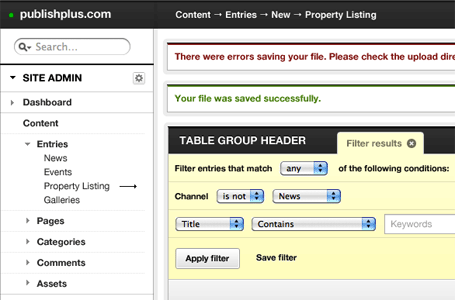
Leevi Graham has been causing a little stir with some tinkering he’s been doing with the EE2 control panel. If you follow back through his Twitter stream, you’ll see for the past few days he’s been chatting about doing a control panel theme of sorts. The thing that got my attention, though, was when he linked to this mockup on Ember. Judging by the retweets and replies, he is definitely tapping into a desire in the EE community for a better-designed control panel.
What do you think? Is this something you’d buy for yourself or your clients?
Blog Entry
A decent size haul this week. We think rEEservation looks interesting because it seems many people have been looking for this functionality in the past. Enjoy!
- rEEservation ($, for EE2) by IntoEEtive (Yuriy Salimovskiy)
This add-on enables you to accept reservations/bookings on your website and handle them easily. In can be used to book hotel rooms, tickets for event etc. Just install the module, place the form on your website and you can start accepting bookings instantly!
- isimage (for EE2) by Tick
A simple plugin to determine if a file is an image. The filename extension is used to determine the filetype.
- Matrix Comments (for EE2) by Pixel & Tonic (Brandon Kelly)
This extension for ExpressionEngine 2 enables per-row commenting with EE’s Comment module.
- Category URL (for EE2) by Johan Strömqvist
Category URL returns the full URL for one specific category based on its parent’s category_url_title’s. Like so: index.php/category_one/category_two/category_three
- Wygwam Upload Tabs (for EE2) by Pixel & Tonic (Brandon Kelly)
This extension for ExpressionEngine 2 demonstrates how to use Wygwam’s new wygwam_config hook. It parses Wygwam’s Upload Directory settings for {username}, {member_id}, and {group_id} tags.
- Matrix URL Title (for EE2) by Pixel & Tonic (Brandon Kelly)
This celltype for Matrix on EE2 gives you the ability to create unique “URL Titles” within your Matrix fields.
- Encaf FreeChimp (for EE1) by Chad Crowell (Encaffeinated)
FreeChimp is a simple Freeform extension that will add a user to your MailChimp subscriber list if they check a checkbox (or other field type) in your form. This works well in contact forms or even a simple “join our newsletter” form in your sidebar or footer.
- Hashtab (for EE2) by Isaac Raway (Airways)
Hashtab automatically returns to the selected CP Publish Tab when refreshing the edit form. This is done by adding a #hash ID to the end of the current URL - which is checked for on each page load. If this value is found, the built-in tab activation script is executed to open the specified tab. This can of course also be used to directly link others to a particular tab of an entry in the EE edit form.
- CE Longer Titles (for EE2) by Causing Effect (Aaron Waldon)
CE Longer Titles is an ExpressionEngine extension that allows you to change the max number of characters allowed in your titles and URL titles.
- Fanceebox (for EE2) by Natetronn
Fanceebox is a add-on for ExpressionEngine 2.x. Its main purpose is to allow for fancybox.net style lightbox popups in the control panel. You can then create popups for your custom fields’ labels. This is a nice feature for settings and instructions so your clients have them right where they need them.
- GWcode SyntaxHighlighter (for EE2) by Leon Dijk (GWcode)
Syntax highlight ExpressionEngine code on your pages from within Wygwam.
- Devotee API (for EE1 & EE2) by Isaac Raway (Airways)
Provides access to the Devot:ee JSON API to allow commercial authors to list their sales in EE templates - use this to build yourself a sales dashboard!
- AffiliateWindow ($, for EE2) by EEvolution
Instant Affiliate Marketing Revenue for your ExpressionEngine Site.
- Last ee (for EE2) by Andrew Jones
Display your last.fm user data using a range of methods.
- Wyvern ($, for EE2) by Brian Litzinger
Wyvern is aimed at bringing a simple and intuitive editor to the control panel, and offer seamless integration with the default File Browser, native Pages module, and 3rd party Structure module to provide the best content entry work flow possible.
Blog Entry
This is an on-going series of entries where we highlight EE experiences we find around the web.
Honestly? #eecms 2 feels like cheating. It’s almost too easy.
Jen Strickland via Twitter
Blog Entry

EE Podcast #39 is up with Ryan and Lea talking about managing file uploads.
Almost every EE website has some sort of file upload requirement. Beyond the built-in FIle Manager, what’s the best way to manage file uploads? What are some thing to consider and pitfalls to avoid? Lea and Ryan explore these questions in this episode of the podcast.
Listen and subscribe: EE Podcast #39: Managing File Uploads on 5by5
Blog Entry
The EE Help Chats are a great way to spend an hour talking shop, getting help figuring out something you’ve been working on, or just hanging out with your soon-to-be-BFFs in the EE Community.
European EE Help Chat
Our European EE Help Chat takes place at 19:00 GMT. If you follow @eeinsider on Twitter, you’ll find a reminder tweet about 15 minutes before. Visit this URL at the time of the chat to gain access to the room: http://mijingo.com/europe-chat
EE Help Chat
The original chat still takes place at the regular time of 9 PM Eastern at http://mijingo.com/go-chat. As with the other chat, we typically post a reminder on Twitter about 15 minutes before.
See you there!
Blog Entry
I’ve often talked about MAMP here and how you can use it to easily localhost your EE site while it is under development. For those of you on Macs and using MAMP, here’s a nice tool for you to try.
While browsing the MAMP.info website the other day, tucked down at the bottom of the page, I noticed a tool I had not seen before: MY MAMP DUMP. Despite the funny name, MY MAMP DUMP is a small set of Automator workflows that allow you to easily (it prompts you for the information it needs) import and export databases with MAMP.

Screenshot of MY MAMP DUMP workflow.
The download comes with two workflows (one for export, one for import) and two application versions of those workflows. If you already use Automator to, well, automate some of your processes while migrating EE sites, this might come in handy.
As an aside: if you haven’t tried Automator yet, I think you should. It’s an easy way to make some of your mundane tasks faster and more efficient. Just one example is how I use it to automatically resize images for this website by dropping them in a folder on my desktop. I could further extend that by having Automator upload them to my s3 account. With shell script, applescript, Finder and tons of application support, there’s a lot you can do with it.
Blog Entry
I just finished reading a great article from Doug Avery on Viget Inspire about running ExpressionEngine on Multiple Machines. They do a lot of things very similarly to how we do them at Happy Cog: Keeping everything in version control, everybody running the site on their local machines, and a heavilly modified config.php.
It will be awhile before I ever tire of seeing smart people write about how they do their group ExpressionEngine setups (famous last words).
There’s a lot of good info in this article, especially if you’re toying with the idea of getting a setup like this going. Right away, I downloaded the PHP scripts that Doug linked to for database management. I’ve long wanted to simplify that process. I also wrote a comment on the article, suggesting some possible changes to the config.php to make it even more location-aware.
Go check it out, it’s a good morning coffee read. If, that is, you like coffee and ExpressionEngine geek talk.
Blog Entry
There is a strange bug in the current build of ExpressionEngine (2.1.3 Build 20101220) that affects the way links are generated on the edit page of the control panel. Apparently the problem is that after the page has loaded, a javascript function is run to add Entry ID’s to each of the links. Until that function runs, the links are no good, usually taking you to the wrong entry or an empty publish page. If you click too early, or just have a really terrible internet connection, you’re out of luck.
The good news is that this was raised in the forums and it will be updated in the next build. Andrew Gunstone explains the issue pretty succinctly in this thread where Sue Crocker confirms that it’s fixed in the next build.
If you can’t wait for the next build, you can try Rob Sanchez’s fix to get things working in the meantime (as long as you don’t mind getting your hands dirty editing EE code). We haven’t tried that fix, but it looks pretty easy to undo if you run into trouble.
Quick note: These are links to the EE Technical Support forum which requires an EE license for access.
 Add Your Comment
 Share on Twitter


