
Review: EE Mobile Admin
Like a lot of you, I’ve been wondering when someone would build an ExpressionEngine Control Panel theme optimized for the iPhone. In fact, I even toyed with the idea of doing something like this myself. Well, I’m glad that someone finally did follow through.
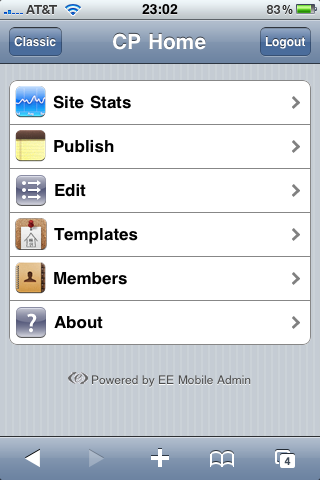 On Monday, Relevate Labs released EE Mobile Admin, an extension (plus theme) that gives you an iPhone-like interface for the ExpressionEngine Control Panel. It looks like an iPhone app, but the interface is completely web-based. If you’ve ever used the IUI interface framework, you know how it works.
Last week, Relevate Labs sent me a copy of the extension to play with and test. I installed it and began using it over the weekend and early this week.
The extension is simple to install—upload the extension file and accompanying directory of view files to your EE installation—and looks really nice when browsed from the iPhone.
Let’s take a quick tour of the interface.
Control Panel Home
When you access the Control Panel in Mobile Safari and are prompted to log in, you do not get an iPhone optimized login screen. This is most likely a technical limitation of EE, not the extension (
Update: Relevate Labs let me know that you can access a mobile login page for your site at /system/mobile_admin/index.php). Once you’re logged in, the extension takes hold and redirects you to the EE Mobile Admin iPhone interface.
The homepage of the mobile interface gives you five options to manage your site. Site Stats, Publish, Edit, Templates and Members. Let’s go through each of them individually and explore the functionality that is available.
Site Stats
This is a handy overview of the high level information about your site; it is a streamlined version of the standard EE Control Panel homepage. You can check if your site is online, view the total page hits and even easily access pending members and comments. The two latter options are the only ones that lead you to another screen in the Mobile Admin interface.
Just like the homepage of the Control Panel, I don’t find this information very useful, but I suppose it is nice to have there if you ever need it.
Publish
Clicking on this option returns a list of all of the weblogs in your EE site. From there you choose to which weblog you’d like to publish and then you get a simplified version of the Control Panel publish screen.
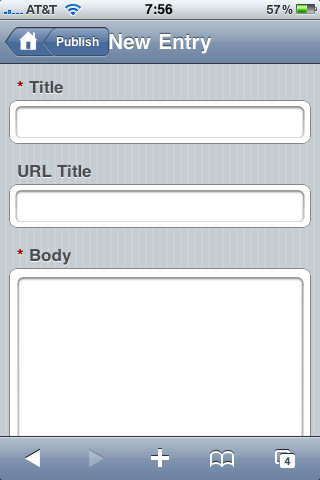 Unfortunately, this doesn’t work with all custom fields. On EE Insider I have a weblog for the EE Help Chat transcripts, which includes a field using Mark Huot’s File extension. This field does not display in the EE Mobile Admin. Of course, considering that uploading files from the iPhone isn’t really practical, I’m not sure it’s needed. I haven’t tested EE Mobile Admin extensively with a lot of publish form add-ons, but it does not work with many of the FieldFrame fieldtypes (nor should I expect it to). If you rely heavily on Playa or another custom interface fieldtype, you might want to consider that before picking up the EE Mobile Admin extension. Any fieldtype that is a standard HTML input should work fine (the File upload noted above notwithstanding).
The top of the Publish form is focused on content and at the bottom you can show and hide additional options like setting the entry date, selecting a category (multiple category selection is possible), setting the status of the entry and comments.
Edit
The edit screen gives you five options to find and edit content: View All Entries, Search Entries, View All Comments, Pending Comments and Search Comments.
The View All Entries screen fits all of the information you’d need to get an overview of entries: status (indicated by a small colored dot), the entry title and the number of comments on the entry (located in parentheses after the title).
Searching for entries is also a nice feature, however, when I used a search term that returned no results, I was greeted with a blank screen instead of a helpful message letting me know that there were no results available.
Template
For some reason I find the inclusion of templates on an iPhone interface a bit strange. I suppose if you had to do a quick template fix on the go that this could come in handy, but that’s about all it is good for. This isn’t a knock on the add-on as much as on the limitations of editing large amounts of text on the small mobile interface.
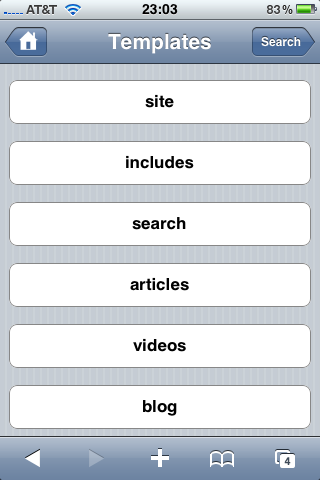 Additionally, the template code display wasn’t always predictable; part of one of my templates actually rendered on the template edit page, which was odd.
I was only able to get some of my templates to properly display in the template editor. Most of them came up blank. At first I thought this was because I have my templates saved as files and the add-on is only pulling templates from the database, but I’m not exactly sure if that’s the reason.
I would probably never edit templates in this interface, so the lack of functionality here isn’t a deal breaker for me.
Members
The Members area gives you some basic functionality for managing pending members and registering new members.
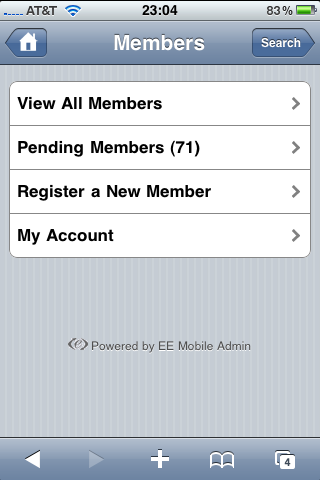 You also have access to your own account in the My Account area. However, you can only view details about your account and, unlike in the normal Control Panel interface, you cannot change your password, screen name and other settings. I don’t see this as a problem as extensive user management probably won’t be done in this interface.
Management of other members is also possible, but it is limited to only changing the assigned member group.
Tucked away at the top right of the Members screen is a search button that allows you to search all members. Unlike the member search in the standard EE Control Panel, which provides multiple fields, in EE Mobile Admin you only have a single field. Unfortunately, just like with the entry search results, if there are no results for a member query, I got a blank page instead of a helpful message.
The Bottom Line
This is a really nice effort by Relevate Labs on their 1.0 release. There are definitely some issues to be ironed out and cleaned up but none that prevented me from using the add-on. The interface looks nice and, except for the items noted above, it acts and works as expected.
I’ve heard a few people complain about the $49.95 price tag (Update: the price has been reduced to $24.95 as a “special introductory offer”). The price isn’t out of line with what other add-ons cost (Playa is $69, Solspace Diggie is $42.95). EE developers are used to paying that type of money for an add-on they need. But that’s the rub. I see EE Mobile Admin as a “nice to have” add-on and not a “it makes building the site easier/better” type of add-on. Playa costs more but the functionality it offers me while building my site is more than worth the price of the license.
But that’s just my take. It is a well-done, quality EE add-on so I have no doubt that some people will find the cost of the license in line with what they’re willing to pay. If a mobile admin interface for EE is a requirement for your project or website, then I would recommend this add-on.
My thanks to Relevate Labs for sending me a test license to use for this review.
EE Mobile Admin is
$24.95 (price was updated after I published this review) and available now from the Relevate Labs website.
Posted on Sep 21, 2009 by Ryan Irelan
 Share on Twitter
Jonathan Longnecker — 04:22 on 09.22.2009
Can you manage comments with this? That’s really the main thing I’d like to be able to do…Delete spam comments. It’s a huge pain trying to do that mobile right now.
Ryan Irelan — 04:26 on 09.22.2009
Yes, you can manage comments. On the Edit screen (not pictured in the review), you can view all comments or pending comments. Once you choose a comment to view you can mark it closed, open or delete it.
You do, however, have to do them one by one, as there’s no multi-delete functionality like we have in the standard Control Panel or even in a native iPhone app.
Ryan Irelan — 05:28 on 09.22.2009
Also, please note the change in price, which I’ve reflected in the review. I think $24.95 is a perfect price point for this add-on.
Hambo — 05:36 on 09.22.2009
Are Fieldframes such as FF Matrix and Playa aren’t supported?
e-man — 06:11 on 09.22.2009
Frankly I’m appalled by all these people whining about the price… developing, designing and coding these things all take time and we all know time is money.
No one likes to work for free, yet all add-ons for EE should be free of charge?
If it’s a good quality add-on with decent support then the low price of most EE-addons is trivial. My 2
Todd — 11:52 on 09.22.2009
Is it MSM compatible?
Jim — 15:57 on 09.22.2009
I completely agree with Ryan. This is a nice to have feature, not an essential addon like Playa. I didn’t think twice about paying for Playa - I needed to have it for my sites.
The price reduction is a welcome sight, but I’d still like to see a video demo to see how it works in action (like every other iphone app has done).
David S — 00:59 on 10.09.2009
Do I need to purchase two installations of EEMobileAdmin admin two different EEsites from the same iPhone?
David S — 00:59 on 10.09.2009
Do I need to purchase two installations of EEMobileAdmin to admin two different EEsites from the same iPhone?