Mike Boyink and Train-ee are launching a new project on Wednesday. But this one isn’t about helping you build websites with ExpressionEngine; it’s about helping to bring clean water to the millions around the world that don’t have the luxury of just turning on a faucet to wash their hands or drink clean water. Specifically, Mike wants to raise enough money to have one well drilled for a needing community. Cost? $5,000.
Proceeds from the eBay auction and other fundraising efforts will be donated to charity:water. charity: water is a non-profit organization bringing clean and safe drinking water to people in developing nations. 100% of the funds this event raises will directly fund a water project through charity:water.
Watch Mike’s video to learn more about the fundraiser:
If you always find yourself picking up a bunch of Solspace add-ons for each project, you might find their new add-on bundle interesting.
For $179.95 you get 5 add-ons: User Module, Tag Module, Related Entries Module, Video Module and Selected plugin. As pointed out in their blog post announcing the bundle, you get 25% when buying the software together.
A few weeks ago, I wrote about the migration of Dan Benjamin’s popular Hivelogic website from a custom Ruby on Rails application to ExpressionEngine.
Dan posted an article to his site detailing his motivation and thinking behind the switch to ExpressionEngine:
But in the end, at long last, there was a winner: ExpressionEngine, a flexible, feature-rich publishing tool with my kind of sensibilities and content-focused priorities. It worked the way I wanted it to work, and I found it very easy to customize. It’s a commercial application, which I see as a plus these days. And there are great resources available for getting started. I used Ryan Irelan’s ExpressionEngine screencasts, an invaluable resource, to help me to integrate the new design with relative ease. I found answers to my implementation questions quickly and easily in the EE forums (questions there are frequently answered by the developers themselves). Hivelogic has been running on ExpressionEngine for about a month so far, and I’ve been very happy with it.
There are hundreds, if not thousands, of ExpressionEngine add-ons out in the wild. Many of those are critical to any sites I develop, so I thought I’d share a list of ExpressionEngine add-ons that I use for almost every project.
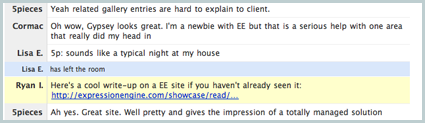
It’s time again for the weekly EE Help Chat. If you need help with EE, come on by the chatroom and ask your questions.
A group of ExpressionEngine developers, users and enthusiasts gather for an hour in an online chatroom to discuss EE and answer any questions people have. The group is comprised of people with different experience using EE, so if you’re new to EE and have a question, don’t be shy!
Simon Collison realizes the major shortcomings of the dozens of URL shortening services out there: the life of those short links are out of the hands of the content creators to whom they link. So, he’s doing something about it.
Today he release a new plugin called EE Shortener, which allows you to create your own short URLs right in ExpressionEngine. Simon provides explanations and sample code to get you started.
I downloaded, installed and tested this plugin and it works as described. It’s free and available now for download.
If you’re not familiar with Capistrano, it’s a Ruby-based deployment tool that was developed for use with Ruby on Rails. I’ve used it in the past to deploy ExpressionEngine websites using SVN, but this using Git is a nice twist. This is a great resource for those serious about deploying EE websites in a more advanced way.
The entire reason we’re making ExpressionEngine 2.0 a CodeIgniter application is because we want to establish it as a valid platform for years to come. It was a forward thinking decision, one that has informed everything else about 2.0’s design and implementation. IE6 is not forward thinking and hasn’t been considered a “modern browser” for 5 years.
I want to reiterate that this won’t affect how you build the front-end of your website. You can support IE 6 (or 5, if you want) with your design and XHTML templates, but in order to use the ExpressionEngine 2.0 control panel in its intended way, you cannot be using IE 6.
Long time developer and noted Ruby on Rails expert Dan Benjamin re-launched his popular Hivelogic website using ExpressionEngine. Yep, you read that right. A Rails developer running EE.
To be fair, Dan is also a pro PHP programmer, so it’s not that he’s new to running (or even building) systems like ExpressionEngine. It’s just that he finally decided to stop writing his own tools and use one that is mature, stable and maintained (by someone other than himself).
I’ve been building my own systems for 10 years and EE had everything I wanted. Using EE gave me an entry point to a system where I didn’t need to write my own software and I could focus on writing and producing content.
I’m happy to report that Dan used my ExpressionEngine Screencasts to get started and they seemed to serve him well. The website is fast under heavy traffic, functional and built according to normal EE development techniques.
To power Hivelogic, Dan is using almost a completely standard installation of ExpressionEngine. The only additional add-on he is using is Akismet, a necessity for combating comment spam. This, I think, is a testament to how powerful and flexible EE is out-of-the-box.
Provider of ExpressionEngine themes and templates, EE Templates is running a contest and plans to give away a bunch (over $1,000 worth) of EE-related prizes.
Here’s how you can enter:
This week’s contest is simple you have to comment here with a short description of why you think you should win. None of this “I am cool therefore I should win” mess. Give us a reason. Got a client site that you need the template for? Trying to learn EE and want to see how someone in the Pro Network would put together a site? All reasons are valid but should be valid reasons. Got it? Good. Now comment away! The first contest will close in 1 week.
Stay tuned to the EE Templates blog if you want to learn how to win any future prizes.
If you’ve ever classed the body of a webpage, you know how flexible it can make styling or theming different sections of a website. Classing the body also comes in handy for highlighting current pages in a site navigation.
In the past, you might have done this by hand. ClassEE Body is a new plugin from “D-Rock” on the EE forums, which automatically classes the body of your template using the segments in the URL.
In his forum post, “D-Rock” explains how the plugin works, but it’s really simple. Place {exp:classee_body} in your body tag and the plugin does the rest.
I downloaded and tested this plugin in my local sandbox of EE 1.6.7 and it works as described.
It is time for the weekly EE Help Chat, where a group of ExpressionEngine developers, users and enthusiasts gather for an hour in an online chatroom to discuss EE and answer any questions people have. There are no dumb questions and we welcome users of all levels of experience with ExpressionEngine. New users are especially encouraged to attend!
FieldFrame is more than just an extension, it’s a “framework for rapid development of fieldtype extensions.“ FieldFrame makes it easy to build custom fieldtypes for the EE control panel publish form.
So, file uploads inside of the data matrix. That, my friends, is total hotness. I actually started to alter Leevi’s extension to do this very thing but now I don’t have to. Thank you, nGen Works.
The File Field fieldtype is free, requires that you have FieldFrame installed and it available now for download. Drop any questions or requests you may have in the EE forum thread announcing the new release.
If you’re looking into implementing version control (what’s version control? A Visual Guide to Version Control) in your workflow, there are a few options out there. A popular and solid choice is Subversion (SVN), a free system that has one main repository on a centrally located server. It’s a great system and I use it for some of my personal projects and it’s our version control system for Airbag projects. Last summer I wrote about Subversion, and how it can improve how you collaborate on project, for A List Apart magazine.
Provider of both free and commercial ExpressionEngine templates, EE Templates has released a new pro template called PhotoStudio.
This new template would be a great starting point for both amateur and professional photographers looking to put their portfolio online. It comes in both black (see in the screenshot) and white versions, is valid HTML Strict and valid CSS.
The portfolio section displays all of the images in thumbnail form and then allows the visitor to either click on the thumbnail to see details about that image or select a category to narrow down the choices to a particular style or event type. This template is also using the 960 Grid which makes any modifications much simpler.
The theme costs $24.95 and there is live demo you can check out before purchasing.

 Add Your Comment
 Share on Twitter