
Blog Entry
 The Pragmatic Studio is known for high quality developer training. Their classes cover iPhone development, Ruby on Rails, Objective C and, now, ExpressionEngine.
I’m happy announce that starting immediately, I’ll be doing private, on-site ExpressionEngine training for organizations and companies.
During the course you will learn how to build powerful websites with ExpressionEngine. It’s a great way to get your internal web team up to speed quickly, learn the necessary skills to manage and build on existing websites or become proficient in EE to build your own site.
The course is hands-on (we’ll be developing a site over the course of the 3-day class) and you’ll learn from my experience building dozens of EE websites.
For an outline of what the course covers, answers to commonly asked questions and how to schedule your own training class, please visit the Pragmatic Studio ExpressionEngine Training class information page.
Blog Entry
The excellent Solspace has released the Template Morsels module. The module, part of Solspace’s performance line of products, stores small pieces of template code into the database for quick reading. Here’s more:
You can create morsels of code containing EE tags and variables inside the Template Morsels control panel, and then display them in your templates using the Fetch tag. These morsels will be refreshed based on refresh rules that you provide.
The module is available for $42.95: A number created using Solspace’s patented pricing model.
Blog Entry
Every week, we bring you the latest and greatest addons added to the wonderful Devot:ee website. This week? No exception.
Thanks per usual to Ryan “Mad Dog” Masuga for the list.
Blog Entry
In last night’s EE Help Chat the question came up about different approaches to building site navigation. Some of the options mentioned were:
All three have distinct pros and cons. Static means there’s no messing with anything; it just works. But, of course, there’s no automatic updating of the navigation when new sections are added to the site. The other three can be problematic to implement because you inherit a certain way of doing things.
So, I ask you, EE Insider readers: How do you set up your EE site navigation? Let us know in the comments.
Blog Entry
Like all great cults swimming the tide towards mainstream, ExpressionEngine users are starting meeting groups around the globe. There are many of note coming up:
New York City
Would there really be an ExpressionEngine meetup without one in New York City? Methinks not my friends.
Time: Wednesday, Oct. 7, 2009 7pm
Place: Rebar / 147 Front Street
DUMBO
Brooklyn, NY 11201
Forum page
Edmonton, Canada
Yes our friends to the north are getting together to start a fierce EE NAFTA rivalry. Our own EE Screencasts is a sponsor and this one has prizes and fun galore.
Time: 9am-12pm Saturday, October 24
Guru Digital Arts @ the Swedish Jewellers Building
200, 10169 — 101 Street
Edmonton, Alberta
Website
Ohio
An entire state! Home of the Rock and Roll Hall Of Fame and forthcoming EE Hall of Fame? Time will tell. My first nominee: Michael Boyink for those beautiful locks (seen here).
This event is currently not scheduled, but you can sign up for notification on their website or follow them on twitter.
EE Roadshow & European EE/CI Conference
While not user group meetups, there are two great conferences happening this fall. Make sure to register for the EE Roadshow and The European ExpressionEngine CodeIgniter Conference happening on October 2nd in Seattle, WA and October 22-23rd in Leiden, Netherlands respectively.
Have a local meetup and want us to announce it to the world? Tell us!
Blog Entry
Derek Allard, everyone’s favorite Canadian coder, has written a great, great post on getting changes made to the CodeIgniter manual. In his scribing, Derek makes a call-to-arms:
If you think you have something worthwhile to add, or a change that would add clarity or utility to the docs, then please feel free to contact me with your suggestions. I’m always happy to hear from a fellow Igniter!
The post goes into EllisLab documentation policy a bit as well. Make sure to read it, as CodeIgniter is the foundation of the forthcoming beta.
Blog Entry
Mark Croxton has released First Child Redirect a plugin for Structure. What does it do?
It allows you to redirect to the first child page of any parent entry in a Structure tree.
I’ve always felt that an extension has reached new levels of greatness when people start developing for the extension.
Blog Entry
Paramore|redd’s Matthew Callis has written a little piece on optimizing EE pagination.
Pagination can create search engine optimization (SEO) problems for any content management system (CMS). ExpressionEngine is no exception. Getting into ExpressionEngine can be quite a task. Some of the hardest tasks become easy, but some of the easiest tasks can become a headache.
Read the article for the code to make it happen.
Blog Entry
EllisLab has updated the ExpressionEngine blog with some great news! The 2.0 beta is entering phase 2, bringing it closer to completion. There are some fantastic tidbits of information in this post; our thoughts and analysis after the quotes.
There is a good chance that this will be the final beta round prior to public release.
A good sign for everyone. The first beta took about 2-3 months. This means ExpressionEngine 2.0 is around the corner. Can you dig it?
The purpose of Phase Two of the ExpressionEngine 2.0 Beta is to get the EE 2.0 beta into the hands of a wide audience.
While Ellislab is not releasing 2.0 to the public, you can sign up to be allowed access. Here’s how you get your name on the list.
- Go and register at the forums.
- Take the How I use ExpressionEngine survey.
- Once you complete the survey, you’ll get a secret passphrase. Then, proceed to register for the beta.
One very important thing to note:
If you share the secret passphrase publicly or privately you will be rejected from the beta.
The application and survey close on October 2nd at 3pm. Get on it people. Also, by completing the survey you get a chance to win an ExpressionEngine mug. Still awaiting word from EllisLab if the long-haired guy with glasses pictured with the mug (on the blog) comes with it. It would also be good to know if phase 3 was profit.
Blog Entry
Like a lot of you, I’ve been wondering when someone would build an ExpressionEngine Control Panel theme optimized for the iPhone. In fact, I even toyed with the idea of doing something like this myself. Well, I’m glad that someone finally did follow through.
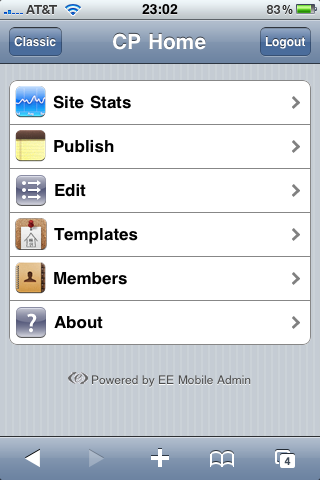 On Monday, Relevate Labs released EE Mobile Admin, an extension (plus theme) that gives you an iPhone-like interface for the ExpressionEngine Control Panel. It looks like an iPhone app, but the interface is completely web-based. If you’ve ever used the IUI interface framework, you know how it works.
Last week, Relevate Labs sent me a copy of the extension to play with and test. I installed it and began using it over the weekend and early this week.
The extension is simple to install—upload the extension file and accompanying directory of view files to your EE installation—and looks really nice when browsed from the iPhone.
Let’s take a quick tour of the interface.
Control Panel Home
When you access the Control Panel in Mobile Safari and are prompted to log in, you do not get an iPhone optimized login screen. This is most likely a technical limitation of EE, not the extension (
however, it would be nice if EE had a mobile-sensitive login page. Update: Relevate Labs let me know that you can access a mobile login page for your site at /system/mobile_admin/index.php). Once you’re logged in, the extension takes hold and redirects you to the EE Mobile Admin iPhone interface.
The homepage of the mobile interface gives you five options to manage your site. Site Stats, Publish, Edit, Templates and Members. Let’s go through each of them individually and explore the functionality that is available.
Site Stats
This is a handy overview of the high level information about your site; it is a streamlined version of the standard EE Control Panel homepage. You can check if your site is online, view the total page hits and even easily access pending members and comments. The two latter options are the only ones that lead you to another screen in the Mobile Admin interface.
Just like the homepage of the Control Panel, I don’t find this information very useful, but I suppose it is nice to have there if you ever need it.
Publish
Clicking on this option returns a list of all of the weblogs in your EE site. From there you choose to which weblog you’d like to publish and then you get a simplified version of the Control Panel publish screen.
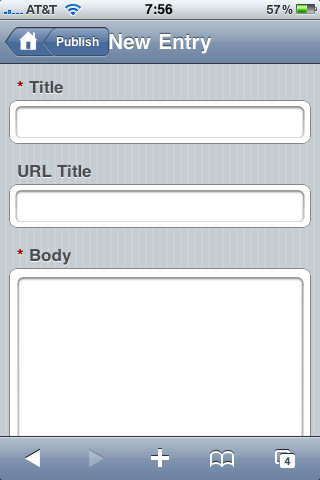 Unfortunately, this doesn’t work with all custom fields. On EE Insider I have a weblog for the EE Help Chat transcripts, which includes a field using Mark Huot’s File extension. This field does not display in the EE Mobile Admin. Of course, considering that uploading files from the iPhone isn’t really practical, I’m not sure it’s needed. I haven’t tested EE Mobile Admin extensively with a lot of publish form add-ons, but it does not work with many of the FieldFrame fieldtypes (nor should I expect it to). If you rely heavily on Playa or another custom interface fieldtype, you might want to consider that before picking up the EE Mobile Admin extension. Any fieldtype that is a standard HTML input should work fine (the File upload noted above notwithstanding).
The top of the Publish form is focused on content and at the bottom you can show and hide additional options like setting the entry date, selecting a category (multiple category selection is possible), setting the status of the entry and comments.
Edit
The edit screen gives you five options to find and edit content: View All Entries, Search Entries, View All Comments, Pending Comments and Search Comments.
The View All Entries screen fits all of the information you’d need to get an overview of entries: status (indicated by a small colored dot), the entry title and the number of comments on the entry (located in parentheses after the title).
Searching for entries is also a nice feature, however, when I used a search term that returned no results, I was greeted with a blank screen instead of a helpful message letting me know that there were no results available.
Template
For some reason I find the inclusion of templates on an iPhone interface a bit strange. I suppose if you had to do a quick template fix on the go that this could come in handy, but that’s about all it is good for. This isn’t a knock on the add-on as much as on the limitations of editing large amounts of text on the small mobile interface.
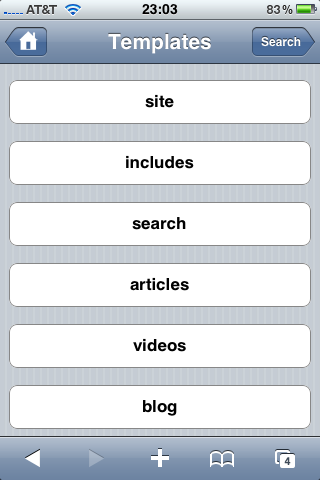 Additionally, the template code display wasn’t always predictable; part of one of my templates actually rendered on the template edit page, which was odd.
I was only able to get some of my templates to properly display in the template editor. Most of them came up blank. At first I thought this was because I have my templates saved as files and the add-on is only pulling templates from the database, but I’m not exactly sure if that’s the reason.
I would probably never edit templates in this interface, so the lack of functionality here isn’t a deal breaker for me.
Members
The Members area gives you some basic functionality for managing pending members and registering new members.
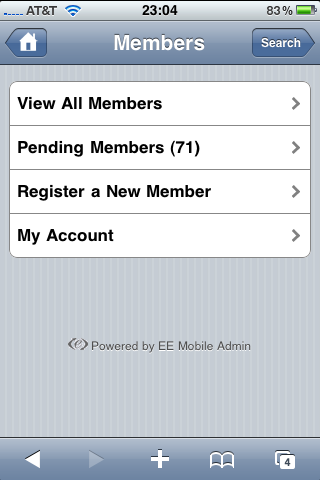 You also have access to your own account in the My Account area. However, you can only view details about your account and, unlike in the normal Control Panel interface, you cannot change your password, screen name and other settings. I don’t see this as a problem as extensive user management probably won’t be done in this interface.
Management of other members is also possible, but it is limited to only changing the assigned member group.
Tucked away at the top right of the Members screen is a search button that allows you to search all members. Unlike the member search in the standard EE Control Panel, which provides multiple fields, in EE Mobile Admin you only have a single field. Unfortunately, just like with the entry search results, if there are no results for a member query, I got a blank page instead of a helpful message.
The Bottom Line
This is a really nice effort by Relevate Labs on their 1.0 release. There are definitely some issues to be ironed out and cleaned up but none that prevented me from using the add-on. The interface looks nice and, except for the items noted above, it acts and works as expected.
I’ve heard a few people complain about the $49.95 price tag (Update: the price has been reduced to $24.95 as a “special introductory offer”). The price isn’t out of line with what other add-ons cost (Playa is $69, Solspace Diggie is $42.95). EE developers are used to paying that type of money for an add-on they need. But that’s the rub. I see EE Mobile Admin as a “nice to have” add-on and not a “it makes building the site easier/better” type of add-on. Playa costs more but the functionality it offers me while building my site is more than worth the price of the license.
But that’s just my take. It is a well-done, quality EE add-on so I have no doubt that some people will find the cost of the license in line with what they’re willing to pay. If a mobile admin interface for EE is a requirement for your project or website, then I would recommend this add-on.
My thanks to Relevate Labs for sending me a test license to use for this review.
EE Mobile Admin is
$49.95 $24.95 (price was updated after I published this review) and available now from the Relevate Labs website.
Blog Entry
Revelate labs has released the EE Mobile Admin extension. It offers the ability to access your control panel from your mobile phone! Here’s more:
Accessing your EE control panel on your mobile device has never been easier. Install this add-on onto your ExpressionEngine site and it will automatically detect when a mobile device (iPhone, Blackberry, Palm Pre or any other mobile device) is accessing the admin.
The extensions sells for $49.95 and we’ll have a review for you later this week.
Blog Entry
CodeIgniter fanatic (in a good way) Noah Stokes penned an article taking web designers to task on the good, the bad and the ugly of the web design professional’s world. He doesn’t waste any time calling it like he sees it:
First, stop thinking your client is stupid. Your client is not stupid. I don’t care if they want an all Flash site sized at 800x600 with a dancing unicorn for the navigation. You may laugh at them behind their back, just remember, they laugh at you when OMG, your precious Tweeter is down. We are in the services industry. Get used to it. Your client is your lifeline. Show them the respect they deserve, even if they don’t deserve it.
So, basically, be a professional. If you think a client’s decision to have a dancing unicorn for the navigation is a bad idea, tell them why it is a bad idea. Give the client real reasons like: “User testing has shown that having unicorns dancing in your navigation negatively impacts your readers ability to actually navigate the site and find content.” Or you could just complain on Twitter (which I regard as a mark of unprofessionalism) that your client wants a dancing unicorn instead of a Home button.
By explaining the problem with dancing unicorns (and there are, I’m sure, many) you may find out some information about your client and the project that will help you deliver a better website. Every crazy idea is an opportunity to learn.
I don’t think anyone is perfect at this. I would venture to guess that even the most seasoned professionals struggle with off-the-wall client ideas and how to constructively respond.
As a developer, it’s easy for me to dismiss an idea as silly or too involved to be worth the costs to develop it. Sure, I could just blow it off and think they’re crazy for wanting such a thing. Or I could ask why they want that feature or piece of functionality and maybe help them solve it in a way that won’t break their bank or cause development to lose focus and momentum.
And that brings me to another one of Noah’s points:
Educate your clients. Sure, you can educate them about their antiquated browsers, but do it in a respectful way, remember, your client is not stupid. Sit down with your client, explain your processes, walk them through the steps you take to build their site. Help them to realize that there is more that goes into building a site than a Frontpage template and some Ajax. Tell them about Information Architecture, A/B Testing, Accessibility, UX, Project Management, SEO, Web Standards. Educate them.
Act like an advisor. They hired you because they seek your expertise; share it with them!
Blog Entry
Solspace has released Comment Uploads, a new extension that allows your users to attach photos or files to comments. It’s funny to see this because just the other day I received exactly this request.
From their announcement on the Solspace blog:
f you have Comment Uploads installed and enabled on your site, your users will now have the additional option of submitting a file (or files!) along with their comment. This could be an image, a PDF, or whatever you want them to upload. Best of all, it uses the existing EE Comments Form and Entries tags, but with a few more parameters and variables.
The Comment Uploads extension costs $23.95 and is available now from the Solspace website.
Blog Entry
It’s a beautiful Thursday and time for your weekly Devot:ee:
Thanks, as always, to Mr. Masuga for putting this together.
Blog Entry
It’s that time again to dig into the Twitterverse and find an inspiring quote about the joys of using ExpressionEngine. Let’s see what we can dig up:
ExpressionEngine 1.6.8 Build 20090915 is out, with about 15 tiny tiny tiny bug fixes.
This is from twitter user hopstudios and… hey wait! Go to ExpressionEngine.com and pick up that tiny update! Thanks Hop Studios for the update we would’ve missed.
Now, on to what they’re really saying about EE.
Very excited by my ExpressionEngine work today 
Indeed, Natalie, as we all are!
Blog Entry
We’ve all had the same problem: building out an ExpressionEngine site involves a lot of mouse-movement and clicking. Dr. Incredible himself, Stephen Lewis, set it upon himself to end all that with his excellent SL Developer Info. This goes in my installs by default. Here’s what it does:
SL Developer Info provides quick links to edit everything; Weblogs, Weblog Fields, Template Groups, Templates, Categories, Statuses, File Upload Locations, the works. It’s all a single click away.
The latest version brings speed and performance improvements.
Blog Entry
One of the nicest documentation pieces I’ve seen, Headspace Design has released an ExpressionEngine client guide. What precisely is the client guide?
Whenever we train our clients on how to use their CMS, we also provide a printed and digital PDF which acts as a quick reference guide. This is great for when clients are trying to remember how to use certain functions of the CMS, and calling us isn’t convenient. This way they can simply look up how to do certain things like publishing content, posting images, etc.
Not only is the presentation beautiful, but the information is dense. Headspace is giving it away for free and for you to use! What an incredibly generous and cool gift to our little EE community. Thank you Headspace.
Blog Entry
The ExpressionEngine private beta has been moving forward for several months. While we can’t reveal any details, we can talk about how it’s going. I asked Leslie Camacho, trusted leader by day/crimefighter by night, if he could give update us with some statistics and interesting facts. Leslie was generous enough to ask each team member for their input!
Derek Jones:
- Bugs in tracker: 43
- Squashed: 147
- Internally, that count is doubled (non user-reported bugs)
- Emails: anywhere from a dozen to a high of over 200 emails per day. Average is in the 20s. These figures do not count forum notifications or emails with staff.
- Hours lost to sleep: What’s sleep?
Another tidbit is that Derek Allard and Derek Jones (or D^2 as their late 90s boy-band used to be called) edit each other’s haiku code comments.
Derek Allard:
- Bugs: There have been very few critical or even major bugs, with most being “this link is broken” type things (at least in the early stages).
- Number of Emails per day: Average probably 10 between CI and EE.
- Number of times I have threatened to quit: 0.
- Number of times I have had to walk away from EE, or hit a conference of vaction: 6
In general, Derek A. feels that they’re “at the end of a process”, which is a great sign for all of us. There is also “at least 1 Easter egg is the result of me making an off-handed comment, followed by Jones saying ‘yeah, do it!.’”
He also left this note:
Number of times Pascal and Allard have grumbled at the US’s shocking lack of national holidays? 4.
As well as healthcare reform, there is an even greater need for more public holidays.
Pascal Kriete:
- Number of ponies in 2.0: Currently at 2 (both clicktracking) plus a robot. I’m told that’s 17% more than last build…
- Hours lost TO sleep? Around 6/day. Didn’t know sleep counts as lost hours… (ed. That’s the viscious tyranny of Gustapo Camacho for you).
- Other stats/tidbits: 200k more lines of code (5333370 compared to 339973 in 1.6)
Robin Sowell has different figures she’s tracking then most:
The first thing to check when the TV Guide site refuses to show the show synopsis for more than half a second? That you have not turned off caching while testing something else.
The first thing to check when you go to post on the EE board and the submit button doesn’t seem to work? Your key pressing technique. Obviously it’s defective. You should push the button REAL HARD at least 10-20 times.
The second thing to check when you go to post on the EE board and the submit button doesn’t seem to work? That you have not turned javascript off while testing something else.
I have also had my cultural horizons expanded working on 2.0 w/Pascal. I learned it’s hot where he is and they don’t have oreos or Hulu access. I forget WHERE exactly he lives, but assume it is one of the lower levels of hell.
From DA I have learned a fine appreciation of killer robot art and javascript animation. And from DJ… I have been exposed to “The Legend of Old Gregg”. Literally. Shudders.
Lastly- as to the number of ponies in 2.0? NOT ENOUGH! NEEDS MOAR PONIES! And not the horrible, evil, mutant js ones Pascal creates to torment me.
...and finally, el jeffe, Mr. Camacho:
- Number of Emails per day: Easily 50-70 on a slow day, though the number I need to respond to varies from 20-30. On days where we post 2.0 progress updates the number usually sky rockets to 200+.
- Significant improvements made: Aside from 2.0 itself, over the last year we’ve upgraded EllisLab to version 2.0. Its the same spirit, attitude, and talent, but now with some much needed non-startup like structure.
- Number of ponies in 2.0: Just enough to keep Robin sufficiently entertained.
- Number of times Pascal has refused to legally change his name to Derek: At least 78.
- Number of times Kenny Meyers got rejected from the beta program: Who is Kenny and why does he keep emailing us? Banned!
Ouch. That stings. It’s OK Leslie, I’ve always been more of a Wordpress kind-of-guy.
Leslie, in closing, left this note:
Number of times Ingmar, Sue, John, and Greg saved our collective butts with their insane testing skills: I lost track so let’s just say “a lot” and give them a round of applause.
The ExpressionEngine support team is one of the best around. We tip our hats to them as well.
Progress
A great sign of progress is that they still have a sense of humor about themselves and the project. No sign of Rick Ellis though, but chances are he’s hovering in the background looking like he can kick your ass (he’s a big dude). Invisible hand, indeed.
Thanks to Leslie for putting this together, and to EllisLab for being generous with their time and attention.
 Comments (1)
 Share on Twitter