
Travis Schmeisser on Structure
by Travis Schmeisser
Editor’s Note: Travis Schmeisser is one of the creators of the popular Structure module. Travis kindly agreed to write an article explaining how Structure came about and how it’s used.
Structure is an alternate method for building ExpressionEngine sites which focuses on pages to create hierarchy for your content. We recently released version 2.0, which is now a commercial module ($65 per site license) and includes several of the most highly requested features to date. There are tutorials and code samples for how to actually setup Structure at both Jambor-EE and the Structure site, but with this article I hope to explain some of the thinking behind the add-on and reveal why it can not only speed up your development, but make your client’s lives a lot easier.
In The Beginning
I first started using EE because of Mark Huot’s Tome module (which was originally called Pages). I’ve tested other CMSes that use the sitemap view convention, but was never happy with how they performed in other areas like custom fields or member management. After using Tome for quite some time, I began hitting a lot of dead ends. It utilized categories for the hierarchy, which was a brilliant use of built-in functionality, but made it hard for clients to add pages or manage certain content. Structure was born out of finding those limitations and features I liked from other CMSes that I felt EE was lacking.
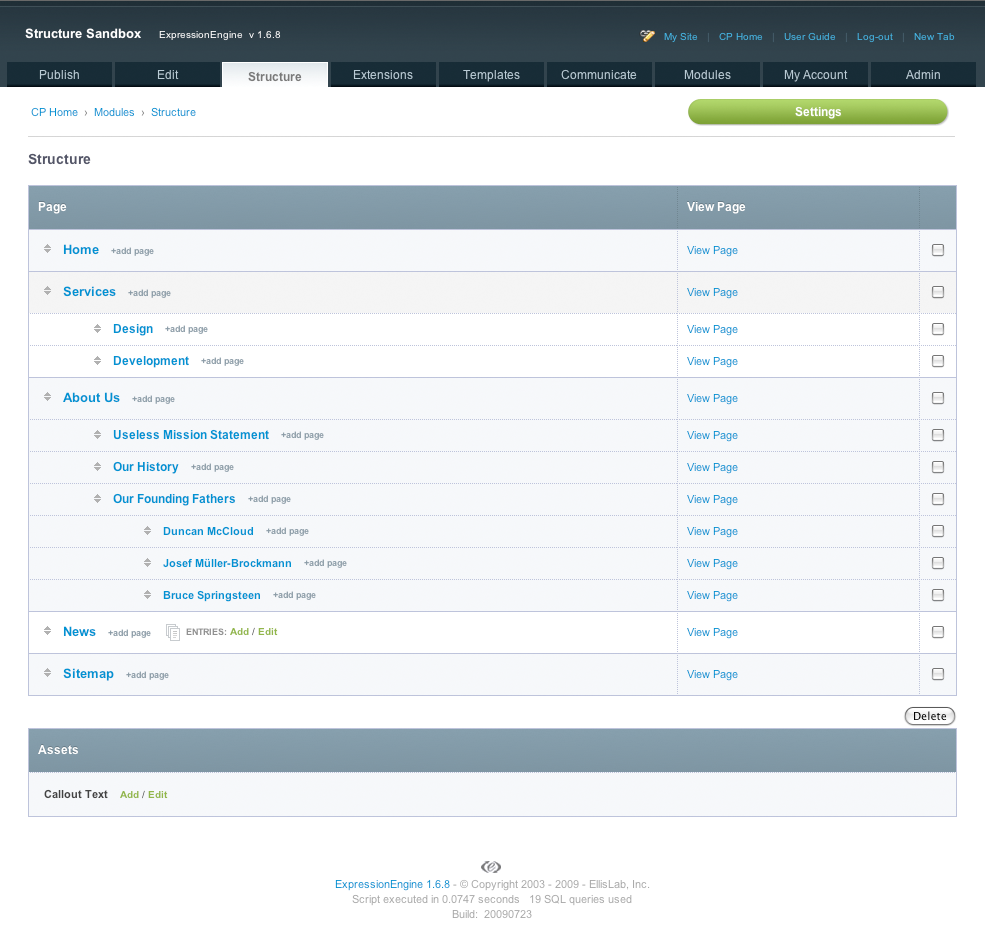
A sitemap on the main Structure page
Content Management & Creation
One of the major concepts central to Structure is the difference between a “static page” and a “listing.” Most pages are static with text-based content and images that encompass a single topic. Of course, because of EE’s custom fields these pages can be as simple or complex as you need them. Mainly the point being they are a single entry related to a certain topic. Some pages though, like a staff listing, news, or press releases have many entries that are gathered into a single page, these are what we refer to as “listings.” Both are managed through the sitemap view, with a listing locked to a page with an “Add” and “Edit” link to create a new listing entry or edit the existing ones.
In 2.0, we introduced a new add page selector, so a child page can be added under any existing page and you’re presented with a menu to select the page type (e.g. which weblog). If you give your weblogs straight-forward names that match the content type, this menu becomes a no-brainer for adding specific types of content.
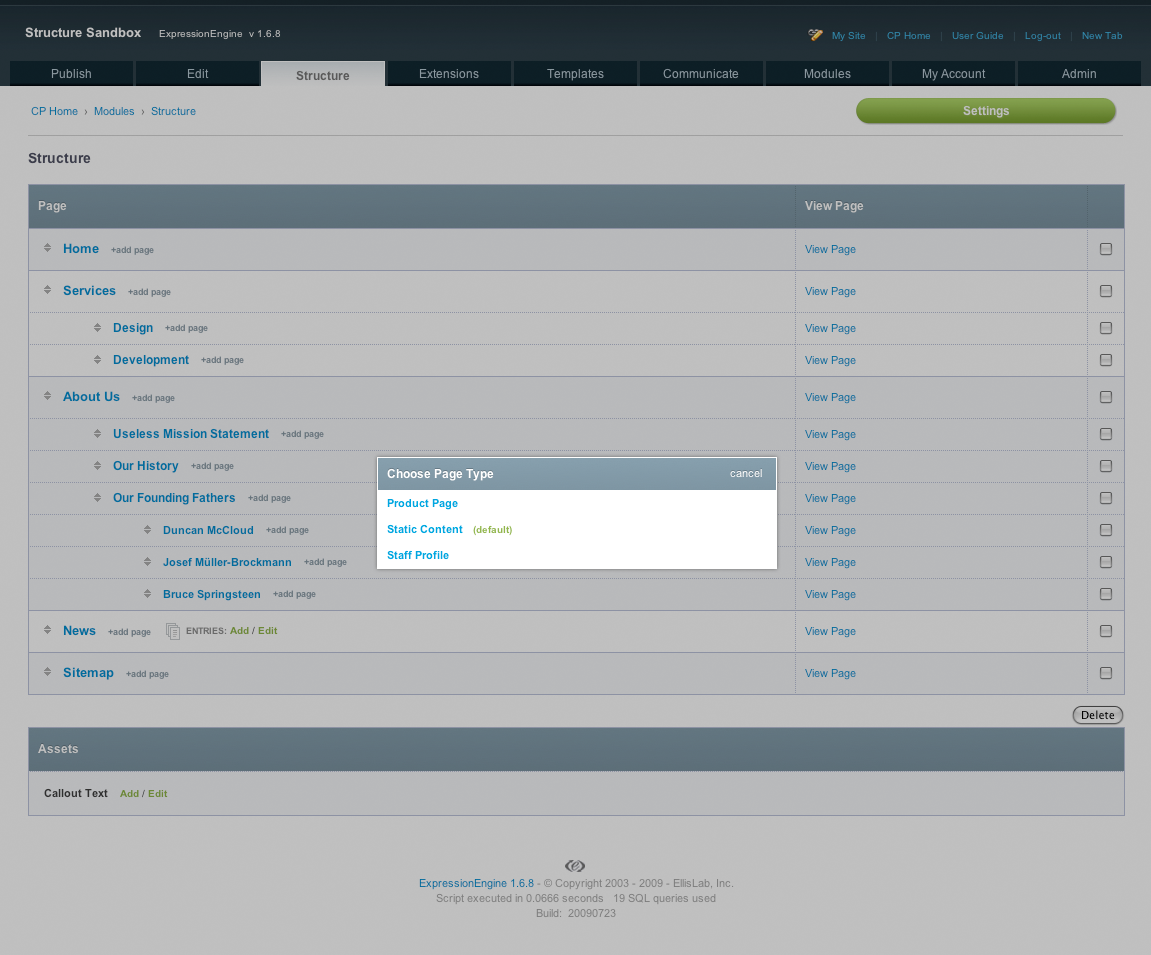
Choosing what type of page to create.
I think one of the large misconceptions about Structure is that you’re locked in or have to use EE the “Structure way” to build with it. The funny thing is, I find using Structure to be more freeform than the traditional templating method. Your content can be moved easily and assigning the hierarchy from existing entries takes minutes. Because you’re not feeding content through template_group/template, the code is quite a bit more modular, making use of {page_uri} and {page_url} to connect to entries. Where the Pages module requires a full URL for each entry (e.g. /path/to/page), each entry in Structure has only a single segment. Moving them requires reassigning a parent, not rewriting full URLs for each page. Each entry (or “page”) can utilize any template you choose, with defaults setup for each weblog. However, at any time you can change a page to not use the default so specialized pages are simple to create. You can also make use of traditional templating methods, whenever you choose. Because EE is so flexible you can call content into your templates a number of ways. You can use Structure conventions and the page-centric model or regular EE templates the same way you always would. This is especially a strong point for listing type pages like news or blog posts. Either way, your content is managed through a simple interface and displayed on the front-end however you choose.
How Structure Helps
Where Structure really shines is for your clients and authors. One of the main reasons we’re building with EE is for clients to have the power to update their own site. If we don’t keep that in mind, it’s easy to create confusing methods or ways to manage content that may seem smart to us, but for most clients get them easily lost. One of the things I wanted to accomplish when developing Structure was a single place to manage all content. As powerful as the Pages module is, I was unhappy with certain content living under the Pages tab, while more listing-based content like blog posts or news would still need to be accessed under the Edit tab. It’s not that complicated, but I found a lot of clients didn’t get it; they don’t understand why their content lives in different areas. Even with the great search and filtering tools available in the CP, staring at a sea of random entries can be daunting. The tree sitemap view of their site that Structure creates makes sense to them. They think of their site in terms of pages and know where content lives according to that. In other words, Structure speaks their language and that goes a long way for clients.
Development is also greatly sped up when using Structure. Pages can either use a common template, shared by many other pages, or have a completely custom template all to themselves. Being able to reuse common templates or layouts can be a great time saver, since most of Structure’s tags are location-aware and adapt to wherever the page is moved to. Navigation, breadcrumbs, title tags and sub navigation are all dynamically generated and mimic everything that is created or reordered throughout the CP interface. This makes adding pages, removing pages, moving them to another parent, or reordering, much easier; without touching any template code. Giving clients this power places more control in their hands in a very intuitive manner, but can also be hidden if needed on a member group basis.
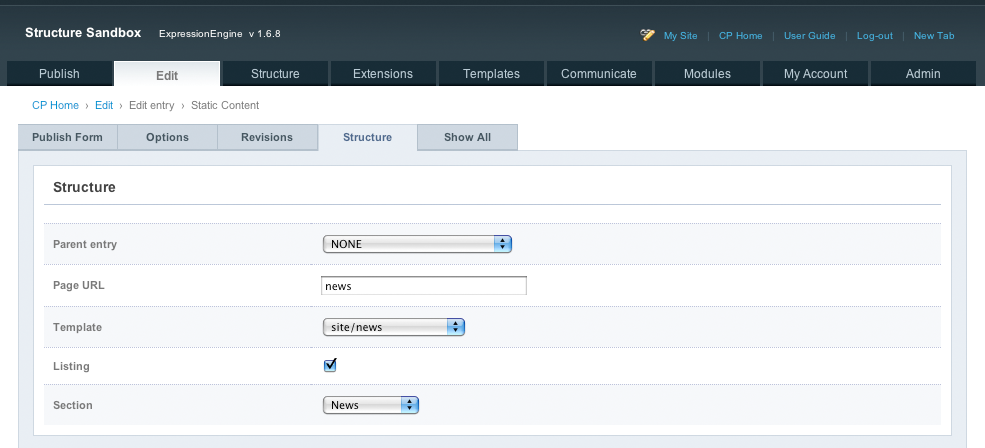
Contents of the Structure tab on the Publish/Edit Entry screen
An Example
Now, to put this all into practice, the new Structure site has a few good examples. Since understanding the different content types is important, we’ll look at two sections. First, the instructions page: http://buildwithstructure.com/instructions. This is straight-forward textual content with a few headlines within a single custom field called {content}. In contrast, the Tags page is a listing: http://buildwithstructure.com/tags. This page actually has no “static” content besides the page title, however because it has the “Tags” weblog attached to it, we can add entries there through the Structure interface. The custom fields include {tag}, {tag_desc} and {attributes} which is a FF Matrix field with several columns for the details. Looking at that page, we can see that I’m using a weblog tag to output the top “jump to” navigation:
<ul id="jump_to">
{exp:weblog:entries weblog="tags" limit="99" dynamic="off" orderby="title" sort="asc"}
<li><a href="#tag_{url_title}">{title}</a></li>
{/exp:weblog:entries}
</ul>
For this section, I felt it was best to keep them all on one page, but for support help I still want the ability to email someone a single page with only the tag they need. You’ll see in the next block of code that we can still drill down to each “page” for a single tag:
{exp:weblog:entries weblog="tags" limit="99" dynamic="off" orderby="title" sort="asc"}
<div id="tag_{url_title}" class="tag">
    <h5><a href="{page_uri}">{title}</a></h5>
    <p><code>{tag}</code></p>
    <p>{tag_desc}</p>
    {attributes}
    <div class="tag_attribute">
        <h3>{attribute_title}</h3>
        <p class="tag_attribute_code"><code>{attribute_parameter}</code>{if attribute_default}, defaults to {attribute_default}{/if}</p>
        <p class="tag_attribute_desc">{attribute_desc}</p>
    </div>
    {/attributes}
</div>
{/exp:weblog:entries}
This is only one example of the flexibility Structure provides. Because EE’s templating system is also so flexible we can manipulate our “pages” in many ways that aren’t page-like or provide a more traditional click through to a single page.
Learn More, Get in Touch
Now that Structure is commercial, Jack McDade and I can provide even better support and continue development of new features. Over the next few weeks the site will include more tutorials, examples and articles for advanced usage. If you have a particular subject you’d like addressed, or further questions feel free to get in touch: contact@buildwithstructure.com
Posted on Nov 10, 2009
 Post to Twitter